ACP Pro

One VS Code sidebar for every AI coding agent — Claude Code, Copilot, Gemini, Codex, and anything else that speaks the Agent Client Protocol.

VS Code extension · MIT licensed

ACP Pro

The problem

Bounce between Claude Code, GitHub Copilot, Gemini CLI, and the rest, and your editor sidebar starts to look like a browser bookmark bar. Each agent ships its own extension, its own UI conventions, its own session model, its own keybindings. One panel. One tab bar. One way to read a tool call.

ACP Pro in action

ACP Pro switching between agents inside one VS Code panel

Highlights

Multi-tab sessions

Each tab is an independent agent session with its own history, model, and permission mode. Run several in parallel inside one panel.

Streamed tool calls

Tool invocations stream live as collapsible cards. File edits render as inline diffs right where the call appeared.

Permission modes per session

default · acceptEdits · plan · bypassPermissions — pick per tab, override per tool call. No context-switching.

Remote session sharing

A built-in HTTP + WebSocket bridge gives you a 6-character share code. Watch your agent from a browser, phone, or pair-programming session.

Run Claude, Gemini, and Copilot side by side

Multi-tab

Run Claude, Gemini, and Copilot side by side

The biggest quality-of-life win. Let Claude refactor one file while Gemini answers a research question and Copilot writes a test — all in parallel, all in the same panel.

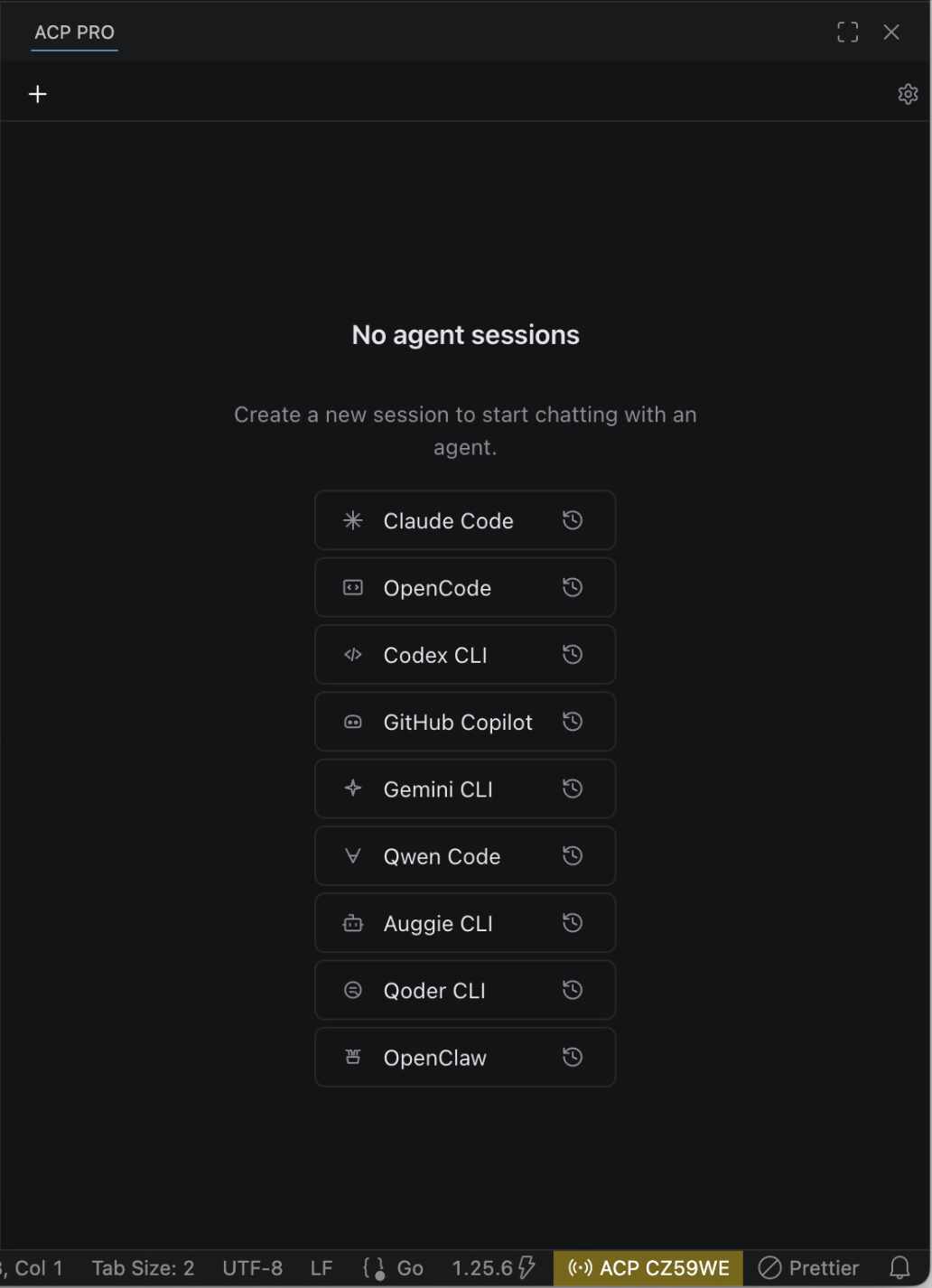
The empty-state view lists every configured agent as a button, so spinning up a new tab is a single click.

Inline diffs where the tool call appeared

Tool calls

Inline diffs where the tool call appeared

When an agent calls read, edit, bash, or web_search, the tool invocation streams in real time as a collapsible card. File edits render as inline diffs right where they happened — no jumping to a separate panel.

Plans get their own collapsible task panel alongside the chat, so you can watch a multi-step agent tick through its work.

Share a live session over the internet

Remote sharing

Share a live session over the internet

Toggle the bridge on and you get a 6-character share code. Open the URL in any browser and you see your live tabs in a read-only view. Pair it with VS Code’s built-in port forwarding (Tunnels / Codespaces / SSH) and your agent session is shareable anywhere.

Great for peeking at long-running tasks from your phone, or pair sessions where the other person doesn’t need the extension installed.

Works with any ACP agent

Out of the box. Add your own with one settings.json entry.

Claude Code
npx @agentclientprotocol/claude-agent-acp@latest
GitHub Copilot
npx @github/copilot-language-server@latest --acp
Gemini CLI
npx @google/gemini-cli@latest --experimental-acp
Qwen Code
npx @qwen-code/qwen-code@latest --acp --experimental-skills
Auggie CLI
npx @augmentcode/auggie@latest --acp
Qoder CLI
npx @qoder-ai/qodercli@latest --acp
Codex CLI
npx @zed-industries/codex-acp@latest
OpenCode
npx opencode-ai@latest acp
OpenClaw
npx openclaw acp

Add your own agent

Anything that speaks ACP over stdio or HTTP slots in.

{
  "acpPro.agents": {
    "My Local Agent": {
      "command": "node",
      "args": ["/path/to/my-agent.js", "--acp"],
      "env": { "MY_AGENT_API_KEY": "sk-..." }
    }
  }
}

ACP Pro speaks the Agent Client Protocol (ACP) — a small JSON-RPC 2.0 schema that any agent can implement. ACP defines how a client (the editor) and an agent (Claude, Copilot, Gemini, …) negotiate sessions, stream messages, request file edits, and run tools.

Because every supported agent speaks the same protocol, the UI doesn’t have to know which one you picked. You launch a tab, choose an agent, and the same chat shell renders the same shape of streamed events — text chunks, thought chunks, tool calls, plans, diffs.

Install from the VS Code Marketplace, click the ACP Pro sparkle icon in the activity bar, and start typing. The default agent is Claude Code — first run takes a moment while npx caches the agent package, then it’s instant.

Comments

  1. Loading comments…